


Big Rig Savings
3.712.00 Reviews
App Specs
- Version
- 5.0.0.0
- Updated On
- License
- Free
- Downloads
- 10,000+
- Developer
- crownsource
- Categories
- Auto & Vehicles
- Platform
- Android
Screenshots
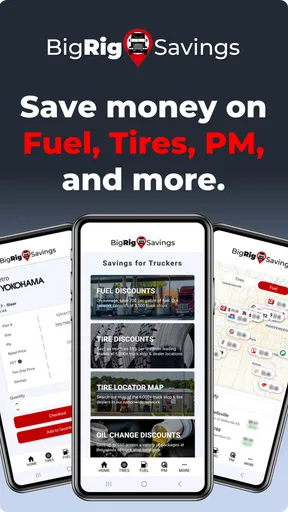
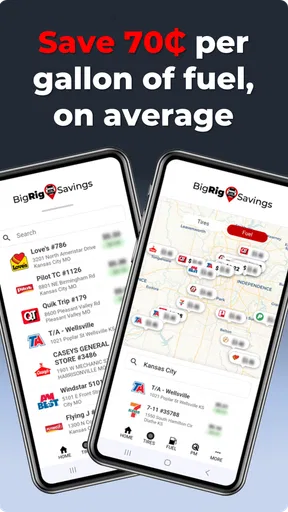
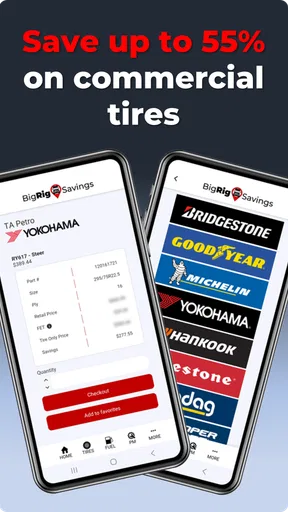
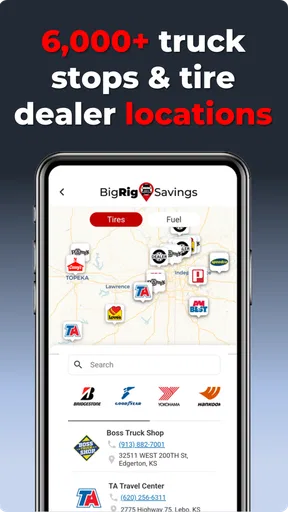
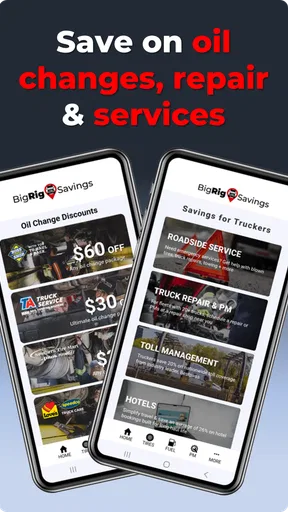
 Analysis by AppCompare
For a trucker, small savings can matter most when they fit naturally into a long working day. Big Rig Savings is a free Android app in the Auto & Vehicles category from crownsource, built around the practical idea of helping over-the-road drivers and fleets keep an eye on operating costs. I approached it less like a flashy travel tool and more like a pocket companion for people who spend serious time behind the wheel.
My first impression is that its appeal depends on your routine. If you drive a heavy truck regularly and want a focused place for savings-related decisions, the app has a clear reason to exist. If you only need occasional directions, traffic information, or a general fuel finder, a standard navigation app may remain more useful. The important question is not whether it replaces every tool in a cab; it is whether it can become a simple part of a cost-conscious driving workflow.
Where the app fits into a working trucker's routine
The app has a focused identity rather than trying to be an all-purpose fleet management platform. That focus is helpful because truck drivers often already work with several tools: navigation, logbook software, dispatch communication, maintenance records, and payment or fuel systems. A narrowly aimed savings app can earn its place if it reduces one recurring decision without adding another complicated process.
I would think of it as a supporting tool for planning and checking, not as the single source of truth for every trip. Before leaving, a driver can use a savings-oriented workflow to think about where costs may be controlled. During a route, it can sit alongside the tools already used for navigation and compliance. After a run, it can help turn a vague feeling that a trip was expensive into a more deliberate review of spending choices.
That distinction matters for fleets. An owner-operator may make decisions quickly and personally, while a fleet manager may care about repeatable habits across several vehicles. The same app can be useful in both settings, but the expected benefit is different. For an individual driver, convenience may be the main attraction. For a fleet, consistency and clear internal procedures matter more than simply installing another app on every phone.
The current release is version 5.0.0.0, and the app supports Android devices running at least Android 4.4. That broad compatibility is practical for drivers who keep an older phone in the cab rather than upgrading frequently. At the same time, older operating-system support should not be confused with a guarantee that every modern phone experience will feel identical. Screen size, battery condition, background activity, and the phone's general performance can still affect how comfortable it is to use on the road.
Its public audience is also worth considering. The app has passed ten thousand installs, with an average rating of 3.7 from twenty-three ratings and twelve written reviews. I read that as a sign of a small but real user base, not as proof that it will suit every trucking operation. A rating in that range suggests that expectations should stay realistic: try it in your own workflow before making it part of a larger fleet process.
Worth Reading Before You Choose

EA SPORTS FC Mobile 26 Is a Bigger Football Game, but It Takes Time

Flipboard Shows What News Apps Must Do Beyond the Feed

Switching to Android Auto Means Rethinking Your Driving Routine

Google Calendar Makes a Crowded Week Easier to Manage

Ludo King Makes the Most of the Minutes Between Plans

Baby Panda World Brings Quick Play to Modern Phones, but Its Game Library Feels Busy
Trust starts with what the app asks you to do
For a cost-related app, trust is not only about the developer's name or the number of downloads. It is also about how clearly the app lets me understand its role. I want to know which actions are optional, which information is necessary for a task, and whether I can use the core experience without surrendering more control than expected. With Big Rig Savings, I would begin by treating the first launch as a review of choices rather than rushing straight into a trip.
That means checking every visible prompt carefully, especially anything related to location, notifications, account access, or saved information. I would grant a permission only when I understood why it was needed for the action in front of me. If a feature works without a permission, I would leave that permission disabled until I had a clear reason to turn it on. This is not a criticism of the app; it is a sensible habit for any tool used around work routes and business decisions.
I also prefer to separate personal convenience from company information. A solo driver may be comfortable entering details needed for an individual workflow, while a fleet employee should first follow the company's rules. Route patterns, vehicle details, and operating habits can become sensitive in a business context even when they seem harmless on a single trip. The safest approach is to decide in advance what the app is allowed to hold and what should remain in the company's established systems.
Because this is a free app, I would not automatically treat that as a promise of a completely private experience. Free does not explain how an app handles information, and it does not replace reading the permission and privacy screens presented on the device. My recommendation is simple: review those screens during setup, revisit them after updates, and use Android's permission controls rather than assuming the initial choices are permanent.
Practical controls I would check before relying on it
My setup routine would be short. First, I would install it on a secondary or work-designated phone if available, particularly when testing it for a fleet. Second, I would open Android's app settings and inspect the permissions that are currently enabled. Third, I would check notifications and battery settings so the app does not become an unexpected distraction or drain during a long shift. Finally, I would look for any account, profile, saved-entry, or sign-out controls that appear inside the app.
Those checks give the user a useful boundary. If I am only exploring savings options, I should not need to provide more information than that exploration requires. If I later decide to use a feature that depends on location or saved records, I can make that choice at the moment it becomes useful. Good control means being able to add access gradually instead of accepting everything before understanding the benefit.
I would also avoid testing the app while the truck is moving. Even a simple savings decision can become unsafe if it pulls attention away from traffic. The better workflow is to review it during a planned stop, before departure, or when a dispatcher or fleet manager is already handling the operational side of a route. That small change makes the app more useful and removes pressure from the driver.
How I would use it on an ordinary trip
Imagine an owner-operator preparing for a multi-stop run. Before starting the engine, I would review the planned route and identify the points where a fuel or operating-cost decision is likely to occur. I would use Big Rig Savings as a planning aid, then compare its practical value with the information already available through my navigation, fuel-card, or fleet tools. The goal would not be to chase every possible saving; it would be to choose an option that is sensible for the truck, the schedule, and the actual route.
At the next scheduled stop, I would make a quick note of what decision was made and why. Was the choice driven by price, distance, convenience, vehicle needs, or the company's preferred process? Recording that reason, whether inside the app or in an approved work system, is more valuable than relying on memory. It helps reveal whether a saving was genuine after considering extra distance, waiting time, and the driver's limited hours.
This is one of the less obvious trade-offs with any savings tool: the cheapest visible option is not always the cheapest operational choice. A detour can add fuel use and time. A crowded stop can create delay. A fleet may value predictable locations over a small difference in price. Big Rig Savings makes the most sense when it supports that broader judgment rather than encouraging a single-number decision.
For a small fleet, I would test it with one driver and one clearly defined use case before rolling it out more widely. For example, the trial could focus on pre-trip planning rather than asking drivers to change every existing process. After several normal runs, the manager could ask whether the app saved time, reduced duplicated searching, or created extra work. This kind of limited trial protects the fleet from adopting a tool simply because its description sounds relevant.
Where it may be stronger than the usual alternatives
The usual alternatives in this space are broad navigation apps, fuel-price services, truck-stop directories, spreadsheets, and fleet management systems. Each is good at something different. Navigation tools are usually better for turn-by-turn routing and traffic. Fleet platforms are usually better when a company needs centralized records, dispatch visibility, maintenance coordination, or reporting. A spreadsheet can be more flexible for an owner who wants to define every cost category personally.
Big Rig Savings is more appealing when I want a dedicated savings perspective without turning a general navigation app into a manual accounting project. Its value is the focus: instead of treating truck operating costs as an afterthought, it invites the driver to make them part of the trip conversation. That can be useful for someone who finds general-purpose tools too broad or who wants a lightweight starting point before adopting a larger system.
The trade-off is depth. I would not assume that a focused savings app can replace a fleet platform's reporting, a navigation app's route intelligence, or a company's accounting process. If your main need is live traffic, truck-specific restrictions, detailed fuel-card integration, or formal expense reconciliation, another category of tool may be the better first choice. This app should earn its place beside those systems, not be judged as a complete substitute for all of them.
There is also a human advantage to keeping the role narrow. Drivers are more likely to use a tool when they understand what it is for. A savings app that becomes part of a pre-trip checklist may be easier to remember than a large platform with many sections that are irrelevant to the day's work. The downside is that every additional app creates another place to check, another interface to learn, and another permission set to manage.
Data-sensitive moments deserve extra care
The most sensitive moments are not necessarily the first screen or the download. They are the moments when the app may be used around a real route, a real vehicle, or a company's operating pattern. Before entering anything, I would ask whether the information is needed for a specific benefit. If the answer is unclear, I would keep the entry minimal and avoid copying private company details into a personal device.
I would be especially careful with shared phones. A device used by several drivers can blur the line between one person's preferences and another person's work information. Before handing the phone to someone else, I would review saved entries, account status, and any visible history. If the app offers a sign-out or reset option, I would use it according to the company's procedure rather than leaving the next driver to inherit the previous user's setup.
Notifications also deserve attention. A useful reminder can become a distraction if it appears at the wrong time, and a notification preview can expose work context on a locked screen. I would keep only the alerts that have a clear operational benefit and disable anything that interrupts driving. Android's notification controls make this an easy place to preserve user choice.
Battery and connectivity are practical trust issues too. A driver should not discover halfway through a route that a secondary app is consuming attention or power needed for navigation and communication. I would test Big Rig Savings during a stationary break, observe how it behaves on the phone I actually use, and avoid depending on it for a decision that cannot be completed if the connection or battery becomes unreliable.
Who should try it, and who should skip it
I think the app is worth trying for owner-operators who want a dedicated savings aid, drivers who regularly make their own operating-cost choices, and small fleets looking for a focused addition to an existing routine. It may also suit someone with an older Android phone, since the minimum requirement reaches back to Android 4.4. The free price makes a cautious trial easier, provided the user still reviews permissions and does not treat installation as proof that the app is suitable for company-wide use.
I would skip it if you need a complete fleet command center, formal accounting, detailed compliance records, or a replacement for truck-specific navigation. I would also skip it if your employer already has a mandatory workflow and does not permit outside apps for route or expense decisions. In that situation, adding a personal tool could create duplicate records or conflicting instructions, even if the app itself is easy to use.
Drivers who dislike switching between apps may also find the trade-off unattractive. The benefit of a specialized tool is only real when it saves more effort than it creates. If I have to enter the same information in several places, compare conflicting results, or explain an informal process to every colleague, a single approved fleet system may be the better option.
My verdict after weighing usefulness against control
Big Rig Savings has a sensible audience and a clear practical theme. I like the idea of giving truckers and fleets a dedicated place to think about savings rather than leaving those decisions scattered across navigation, fuel, and accounting tools. Its free availability and broad Android compatibility lower the barrier to testing it, while the modest public rating and relatively small review base tell me to evaluate it in my own routine instead of assuming universal approval.
My recommendation is a controlled trial. Install it on the phone you actually use for work, inspect the visible permissions and account choices, and test it only during planned stops or pre-trip preparation. Start with one repeatable task, such as reviewing a cost decision before departure. If it makes that task clearer without duplicating your existing systems, keep it as a supporting tool. If it adds another layer of checking without a measurable benefit, remove it and stay with the tools your fleet already trusts.
The strongest reason to consider it is not the promise of effortless savings. It is the chance to build a more deliberate habit around everyday truck costs. The strongest reason to be cautious is that no focused app should be allowed to replace judgment, safe driving practice, or an employer's approved records. For the right driver, that balance makes this Auto & Vehicles app a reasonable experiment; for everyone else, a conventional navigation or fleet solution may remain the more complete choice.
Overall, I see Big Rig Savings as a focused companion rather than a full transportation platform. It is best approached with clear boundaries, limited permissions, and a specific job to perform. For an owner-operator or small fleet that wants to test a savings-centered workflow without paying for a larger system, it is worth a careful look. Just make the app prove its usefulness on real, stationary planning moments before allowing it to become part of the daily operation.
Pros
- Helps compare prices on truck parts and accessories in one place.
- Useful for finding discounts tailored to heavy-duty vehicle owners.
- Product listings can make budgeting maintenance costs easier.
- Convenient mobile access while shopping or planning repairs.
- May help independent drivers reduce recurring operating expenses.
Cons
- Savings and product availability may vary by location and supplier.
- Some deals may require checking shipping costs before purchasing.
- Not every truck model or part may be supported in the listings.
- Comparing final prices can take time when offers have different terms.
- Users may need another app or website to verify product compatibility.
FAQs for Big Rig Savings
What is Big Rig Savings, and who is it designed for?
Big Rig Savings is a savings and discount-focused app aimed at truck drivers, owner-operators, fleet managers, and other professionals in the trucking industry. It is intended to help users discover relevant deals, promotions, and money-saving opportunities connected with fuel, maintenance, travel, equipment, or trucking services. Availability and usefulness may depend on your location and the participating businesses listed in the app.
How can Big Rig Savings help truck drivers reduce their expenses?
The app can help users look for discounts and special offers that may reduce common operating and travel costs, such as fuel, food, lodging, repairs, truck parts, or other services. Savings are not necessarily guaranteed on every purchase, because offers may have conditions, expiration dates, geographic restrictions, or limited availability. Always review the individual deal before relying on it.
Is Big Rig Savings free to download and use?
Big Rig Savings may be available to download without an upfront charge, but users should check the current Google Play Store or Apple App Store listing for the latest pricing information. Some features, memberships, partner offers, or services could involve additional costs. Before completing registration or accepting an offer, carefully review any displayed terms, subscription details, renewal conditions, and applicable purchase requirements.
Does Big Rig Savings work everywhere in the United States or Canada?
The usefulness of Big Rig Savings can vary depending on the region, participating merchants, and the offers currently available in the app. Some discounts may be limited to specific states, provinces, cities, truck stops, or partner locations. If you travel across multiple routes, enable location access when appropriate and check whether an offer is valid near your destination before changing your plans.
Is my personal information safe when using Big Rig Savings?
Before creating an account, users should review Big Rig Savings’ privacy policy and the permissions requested by the application. Depending on its features, the app may collect information such as an email address, profile details, location data, device information, or usage activity. Only grant permissions that are necessary for the features you want, and confirm how information is stored, shared, and used.


